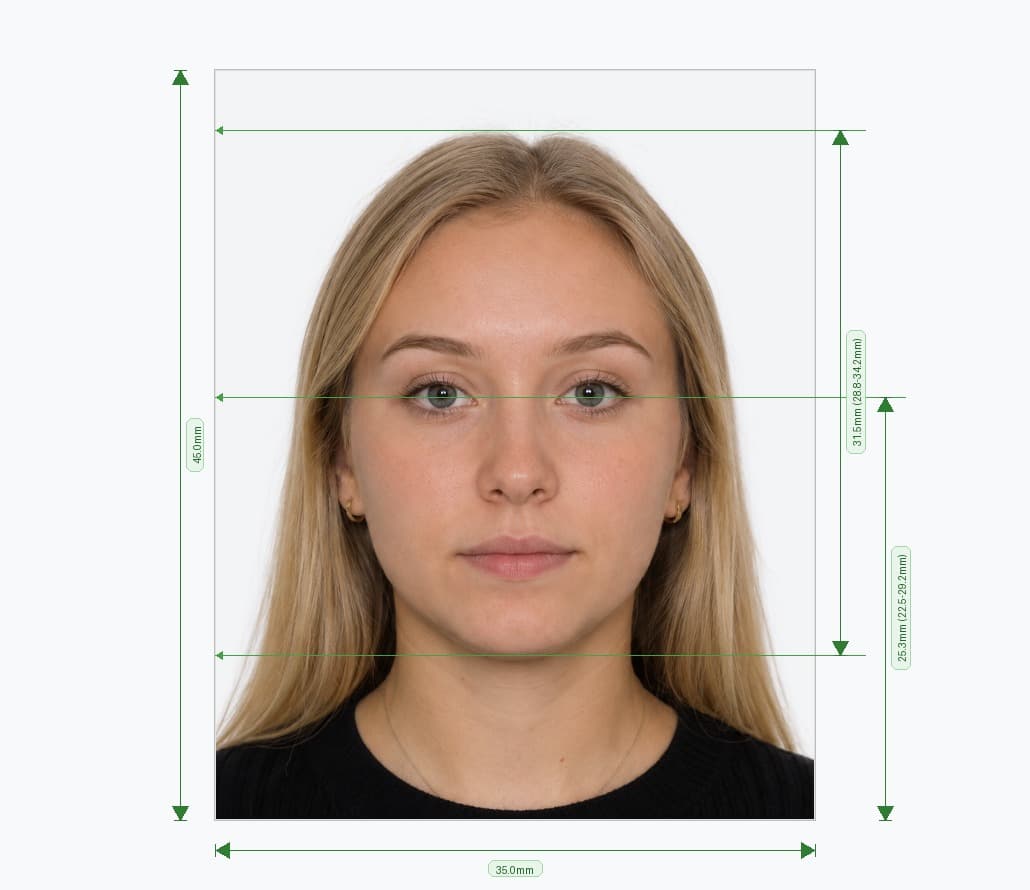
US Visa Photo Requirements: Official U.S. Department of State Guidelines
A compliant photograph is a mandatory component of every U.S. visa application. The U.S. Department of State, through its official portal Travel.State.Gov, enforces strict technical specifications for dimensions, facial proportions, background color, lighting, and attire. Every uploaded photo is screened by automated biometric algorithms at the Consular Electronic Application Center (CEAC) and subsequently reviewed by a consular officer. Submitting a non-compliant photo can lead to instant upload rejection during your DS-160 submission or administrative delays at your consular interview.
This comprehensive guide details the exact photographic criteria required for all U.S. nonimmigrant and immigrant visa categories.
Official US Visa Photo Dimensions & Digital Specifications
For online visa applications (including the DS-160, DS-260, and Electronic Diversity Visa system), applicants must submit a digital image conforming to the following technical standards:
| Specification | Official Standard | Permissible Range |
|---|---|---|
| Aspect Ratio | 1:1 (Perfect Square) | Height must equal width |
| Digital Dimensions | 600 × 600 pixels | 600 × 600 px minimum to 1200 × 1200 px maximum |
| Printed Dimensions | 2 × 2 inches (51 × 51 mm) | Exact physical cut size for interviews |
| Resolution | 300 DPI (Dots Per Inch) | 12 pixels per mm (minimum) |
| File Format | JPEG (.jpg) | Standard baseline JPEG only |
| Maximum File Size | 240 KB | Must be ≤ 240 Kilobytes |
| Compression Ratio | 20:1 or less | No aggressive artifacting or blur |
| Color Space | 24-bit sRGB color | True color only; grayscale and B&W prohibited |
Head Proportion and Eye Line Placement (Biometric Composition)
The U.S. Department of State composition template defines strict boundaries for head size and eye alignment within the square frame:
- Head Height Ratio: The vertical distance from the bottom of your chin to the top of your head (including hair) must occupy between 50% and 69% of the total image height. On a standard 600×600 px image, this corresponds to 300 to 414 pixels (1 inch to 1⅜ inches / 25 mm to 35 mm).
- Eye Level Height: Measured vertically from the bottom edge of the photo up to the level of your eyes, the eye line must sit between 56% and 69% of total photo height (336 to 414 pixels on a 600×600 px image, or 1⅛ to 1⅜ inches).
- Horizontal Centering: The center of your head and nose bridge must align with the exact horizontal midpoint of the frame.
Background & Lighting Specifications
The photograph must be taken in front of a plain white or off-white background. Any background that is patterned, textured, colored, or shadowed will result in immediate disqualification.
- Uniform Illumination: Light must be balanced evenly across both sides of the face. Harsh shadows under the chin, across the nose, or cast against the backdrop are strictly prohibited.
- No Flash Glare or Overexposure: Washed-out skin tones or high-contrast hot spots from direct flash will fail automated contrast checks.
- No Objects or Other Persons: No other person, chair back, headrest, or background object may appear in the photo.
Facial Expression, Pose & Biometric Visibility
| Parameter | Mandatory Requirement |
|---|---|
| Facial Expression | Neutral expression with mouth closed and jaw relaxed; no smiling, showing teeth, or frowning |
| Eyes | Both eyes open, clearly visible, and looking straight into the camera lens |
| Head Orientation | Full frontal view; no tilting, turning, or high/low angles |
| Photo Recency | Taken within the last 6 months to reflect current facial appearance |
| Digital Manipulation | Zero editing, smoothing, filters, background blur, or AI alteration of facial features |
Strict Zero-Eyeglasses Policy
As of November 1, 2016, eyeglasses are strictly banned in all U.S. passport and visa photographs. This prohibition applies to prescription glasses, reading glasses, bifocals, sunglasses, and tinted or transitional lenses. The Department of State enacted this rule because flash reflections, lens glare, and frame rims obscure the biometric iris pattern, leading to high failure rates in automated border systems. The only exception is an extremely rare, documented medical necessity (such as recent ocular surgery) accompanied by a signed statement from an ophthalmologist.
Dress Code, Headwear & Accessories
- Everyday Attire: Wear casual, everyday clothing in dark or contrasting colors (such as navy, black, green, or burgundy) so your shoulders stand out cleanly against the white background. Avoid white or light cream shirts that blend into the backdrop.
- No Uniforms: Uniforms, clothing that resembles military or law enforcement gear, and camouflage patterns are prohibited.
- Religious Headwear: Head coverings worn daily for religious purposes are permitted, provided a signed statement verifying daily religious practice is submitted. The head covering must not obscure the hairline or facial oval, and it must not cast any shadows across the face.
- Headphones & Electronics: Wireless earbuds, headphones, Bluetooth devices, and smart glasses are not permitted in the photo.
Photo Requirements by U.S. Visa Category
| Visa Category / Form | Required Format | Quantity & Submission Method |
|---|---|---|
| Nonimmigrant Visa (DS-160) B1/B2, F-1, H-1B, J-1, L-1, O-1 | Digital JPEG (600×600 px to 1200×1200 px, ≤240 KB) | Uploaded directly during the online DS-160 application. Bring 1 printed 2×2 in copy to your embassy interview as a backup. |
| Immigrant Visa (DS-260) Family, Employment, Diversity Visa | Physical 2 × 2 in prints + Digital upload | Two (2) identical printed 2×2 in photographs on glossy or matte photo paper brought to the consular interview. |
| Diversity Visa Lottery (DS-5501) Electronic Diversity Visa (E-DV) | Digital JPEG (600×600 px, ≤240 KB) | Uploaded online with entry. Photos older than 6 months or reused from previous entries will lead to automatic disqualification. |
| Green Card / USCIS Filings Forms I-485, I-130, I-765 (EAD), I-131 | Physical 2 × 2 in prints | Two (2) identical printed 2×2 in photos submitted with the USCIS application package. |
How to Take a Compliant US Visa Photo at Home with a Smartphone
- Set Up Your Backdrop: Stand 4 to 6 feet away from a smooth, plain white wall in a room illuminated by soft daylight from a window.
- Position the Camera: Have a friend hold the smartphone at your eye level, approximately 4 to 6 feet away. Avoid front-facing arm selfies, which cause wide-angle lens distortion that exaggerates the nose and alters facial geometry.
- Check Your Pose: Look directly into the lens with both eyes open, mouth closed, and a neutral expression. Ensure hair is tucked behind your ears so your eyebrows, eyes, cheeks, and jawline are fully visible.
- Upload to an AI Validator: Use an online tool like PixPassport's US Photo Editor to automatically crop to 600×600 px, align the 50%–69% head ratio, verify lighting, and export a ready-to-upload JPEG under 240 KB.
Frequently Asked Questions
Avoid Passport & Visa Photo Rejections
Our automatic AI tool fixes background shadows, crops to exact millimeter specs (2x2" or 35x45mm), and guarantees 100% biometric compliance.
Create & Fix My Photo Now