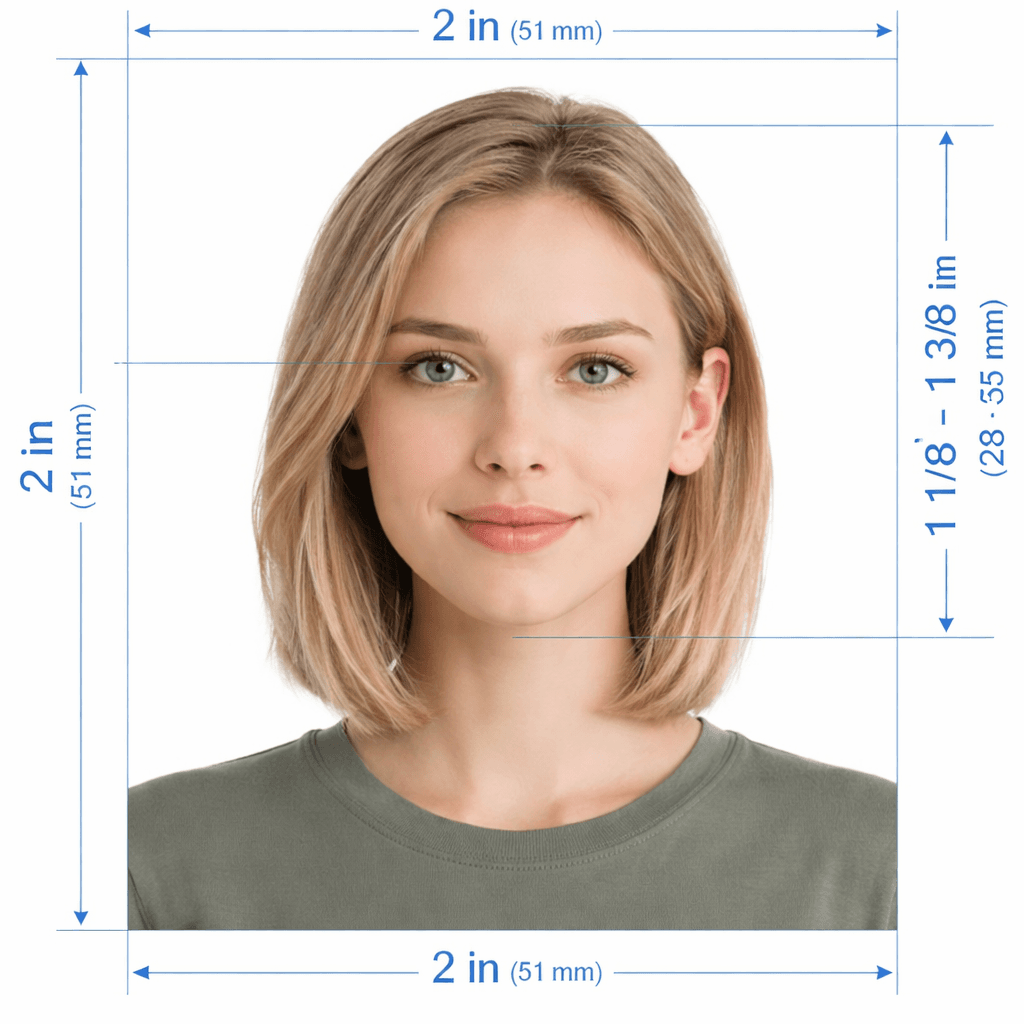
Official USA Driver's License Photo Editor · Real ID Compliant

USA Driver's License Photo Editor: Make 2×2 in Real ID Photos

Crop, remove background, and format your driver's license picture in 30 seconds

Automated AI cropping to official 2×2 inch (600×600 px) dimensions with pure white background, centered eye line, and 50%–69% head height for all 50 US state DMVs.

Free DMV Validator
4.9 · Trusted by 25,000+ drivers nationwide
🔒Secure & Private
⚡Results in 30s
🇺🇸50 States DMV
🆓Free Validation
Before & After
Before – original casual photo
After – compliant DMV Real ID photo
BEFORE
COMPLIANT ✓
← drag to compare →

Processed · White background · 2×2 in crop · Print-ready

Example Output

See your driver's license photo transform

From upload to print-ready — the complete process with official 2×2 in Real ID biometric compliance built in.
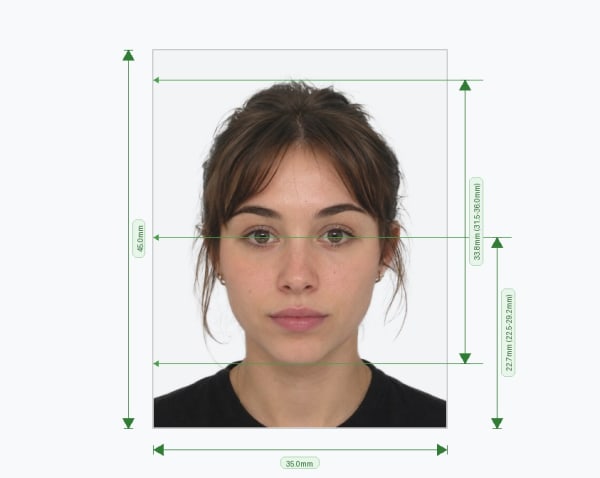
Driver license photo with biometric measurements
Photo Processing
Face detection with 50%–69% head ratio measurements applied
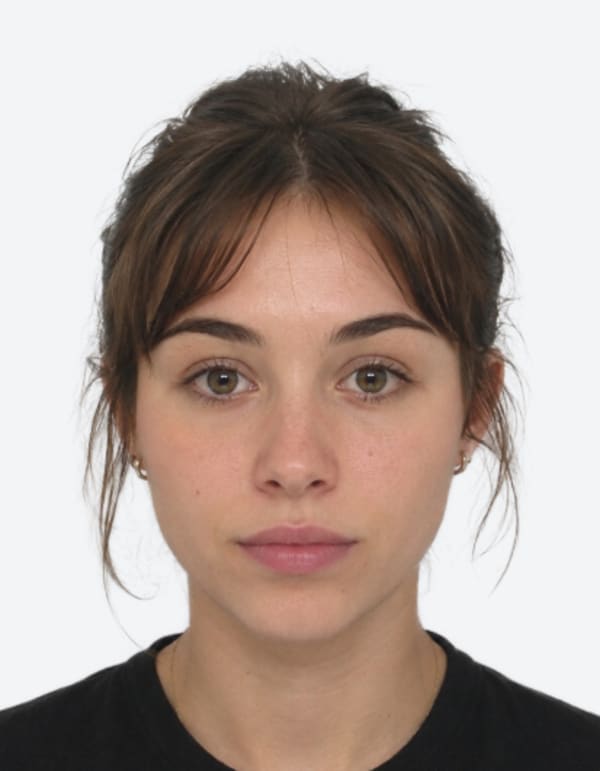
Final compliant driver license photo
Final Output
Official 2×2 in (600×600 px) image with pure white background
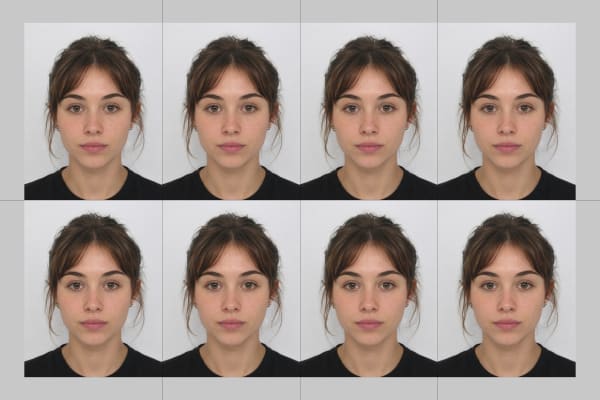
4x6 print sheet for pharmacy
Print Template
Ready-to-print 4×6 inch sheet with 4 photos for under $0.50
✂️ AI Driver's License Photo Cropper & Editor

Crop & Format Your Driver's License Photo

Select your state DMV or license type. We'll size, crop, and format it to exact 2×2 inch Real ID specifications.

Click to upload or drag & drop

Supports JPG, PNG, WEBP, or HEIC from any smartphone or camera

Step-by-Step Process

How to create your driver's license photo online

Follow our easy 5-step automated workflow to generate an official 2×2 inch photo ready for renewal or DMV appointments.

📤01

Upload Portrait

Upload a casual portrait or selfie taken with your smartphone, tablet, or digital camera.

⚡02

Biometric Validation

AI scans facial landmarks to check head height, eye alignment, illumination, and no-glasses compliance.

✂️03

AI Crop & Background

Automatically crops to 2×2 inches (600×600 px) and replaces background with seamless solid white.

💳04

Affordable Pricing

One-time low fee starting at $2.99 with 100% government acceptance guarantee.

⬇️05

Download & Print

Receive single digital JPEG and ready-to-print 4×6 inch sheet to print 4 photos for under $0.50 at Walgreens/CVS.

Official Requirements

USA Driver's License & Real ID Photo Specifications

Strict parameters enforced by all 50 state motor vehicle agencies and the Department of Homeland Security.

Print Dimensions
2 × 2 in (51×51 mm)
Official Real ID & State DMV size
Digital Pixels
600 × 600 px
300 DPI high-resolution export
Background
Plain White
Uniform, shadow-free illumination
Eye Position
56% – 69%
Measured from bottom edge
Head Size
50% – 69%
1 to 1⅜ inches chin-to-crown
Expression
Neutral / Relaxed
Mouth closed, no teeth, eyes open
Rejection Prevention

Common Reasons Driver's License Photos Get Rejected

Learn what causes photos to fail DMV intake scanners and how our automated engine corrects them.

01

Eyeglasses Glare & Reflections

Federal Real ID standards strictly prohibit eyeglasses, sunglasses, and tinted lenses in driver's license photos.

✓ Fix: Our verification engine ensures zero-glasses compliance before export.
02

Shadows Behind Head or on Face

Uneven lighting casts dark shadows that disrupt state DMV facial biometric recognition software.

✓ Fix: AI automatically removes shadows and generates a pure 255/255/255 white background.
03

Incorrect Head Proportions

Standing too close or too far puts head height outside the mandatory 50%–69% range.

✓ Fix: Smart auto-framing resizes and centers your head to exact 1 to 1⅜ inch proportions.
04

Face Tilted or Off-Center

Looking away from the camera lens or tilting your head distorts facial biometric measurements.

✓ Fix: Face orientation algorithms re-level and align your eye line horizontally.
Photo Taking Guide

How to Take a Passing Driver's License Photo

Follow these simple tips with any phone or digital camera before uploading.

🪟

Face a Window in Daylight

Soft natural daytime light removes harsh shadows from your face, nose bridge, and the wall behind you.

📷

Camera at Eye Level

Have a friend hold the camera 4–6 feet away at eye level. Avoid close-up front-camera selfies that distort facial features.

👗

Wear Contrasting Dark Colors

Choose navy, black, burgundy, or dark green tops. Avoid white or light pastel shirts that blend into the white backdrop.

💇

Hair Off Face & Shoulders

Tuck hair behind your ears so both eyes, eyebrows, cheeks, and full jawline remain clearly visible.

😐

Neutral, Forward-Facing Pose

Look straight into the camera lens with both eyes open, mouth closed, and a natural relaxed expression.

👓

Remove All Glasses & Hats

Remove eyeglasses, sunglasses, hats, and headphones. Religious head coverings are allowed if full face is visible.

Data Protection

Your Privacy is Guaranteed

We take privacy seriously with automatic data deletion and strict compliance with global privacy standards.

⏱️

24-Hour Auto-Delete

All original photos are automatically and permanently deleted from our servers after 24 hours.

🔗

Expiring Download Links

Download URLs are encrypted and expire after 1 hour. No permanent public access.

🛡️

GDPR & CCPA Compliant

Full data deletion rights. We adhere to the highest global digital privacy regulations.

🗑️

No Permanent Storage

We never sell or share your biometric data. Your photographs belong strictly to you.

Common Questions

Frequently Asked Questions

What are the photo dimensions for a USA Driver's License and Real ID?
The standard photo size for a US Driver's License, Real ID, and State ID card is 2×2 inches (51×51 mm). In digital pixels at 300 DPI, this is exactly 600×600 pixels (up to 1200×1200 pixels). The head must take up between 50% and 69% of the photo's total height (1 inch to 1 3/8 inches from the bottom of the chin to the top of the head).
Can I bring my own printed photo to the DMV?
Yes, in many states and for mail-in or online driver's license renewals, you can submit your own compliant 2×2 inch photograph. In states where the DMV camera takes your picture on-site, having your photo pre-formatted and ready ensures you have a compliant reference image and can preview your appearance before your appointment.
Are eyeglasses permitted for US Driver's License and Real ID photos?
Under federal Real ID and Department of State guidelines, eyeglasses and sunglasses are strictly prohibited. Even prescription glasses must be removed to avoid lens glare and reflections that interfere with automated biometric facial recognition software.
What background color is required for a US Driver's License photo?
State DMVs require a plain, smooth white or off-white background with even lighting and no visible shadows behind the head or shoulders. Our tool automatically detects and replaces your background with a compliant, uniform backdrop.
Can I smile in my USA DMV picture?
Most state motor vehicle departments allow a natural, relaxed expression with a subtle, closed-mouth smile. Avoid a wide open-mouth smile or bared teeth, since these disrupt the facial landmarks that state biometric software measures. Keep your eyes open and look straight at the camera for the cleanest result.
What color should I wear for my DMV and driver's license picture?
Wear everyday casual clothing in solid dark or rich colors (like navy, dark green, black, burgundy, or royal blue) that contrast cleanly with the white background. Avoid wearing white shirts, light cream pastels, camouflage patterns, or uniforms.
How should I style my hair for a DMV picture?
Pull your hair away from your face so both eyes, both eyebrows, your cheeks, and your full jawline stay visible. Skip tall updos, wide buns, or voluminous styles that push past the top or sides of the 2×2 inch frame.
Do all 50 states follow the same Real ID photo rules?
Core rules stay consistent nationwide because Real ID is a federal standard: 2×2 inch dimensions, 50%–69% head height, no glasses, a plain white/light background, and a neutral or natural expression. All state licensing agencies (such as CA DMV, NYS DMV, TX DPS, FL DHSMV, and PA PennDOT) adhere to these baseline biometric requirements.
Can I upload this photo for an online driver's license renewal?
Yes. Many state DMVs and motor vehicle portals now accept self-submitted digital uploads for online renewals and duplicate card requests, provided the JPEG file is 600×600 px with a solid white background and meets no-glasses rules.
How do I print my driver's license photo on 4×6 photo paper?
PixPassport generates a standard 4×6 inch print template containing 4 identical 2×2 inch photos. You can send this 4×6 file to your local Walgreens, CVS, Walmart, or Target photo kiosk for under $0.50 and cut the photos out with scissors.
What happens if a photo gets rejected at the DMV counter?
If an in-office photo taken by a clerk does not meet standards, they will simply retake it on the spot. Preparing a pre-formatted, compliant photo with our tool ensures your appearance and biometric framing are perfected in advance for mail-in, online, or in-person renewals.
How often do I need a new DMV picture?
You typically need a fresh photo each time you renew your driver's license or state ID card, generally every 4 to 8 years depending on your state. A new photo is also required after legal name changes, card replacements, or REAL ID upgrades.
What is the turnaround time for generating my license photo?
Our automated AI processing engine detects your facial landmarks, crops to exact dimensions, replaces the background, and generates both digital and 4×6 print files in under 30 seconds.