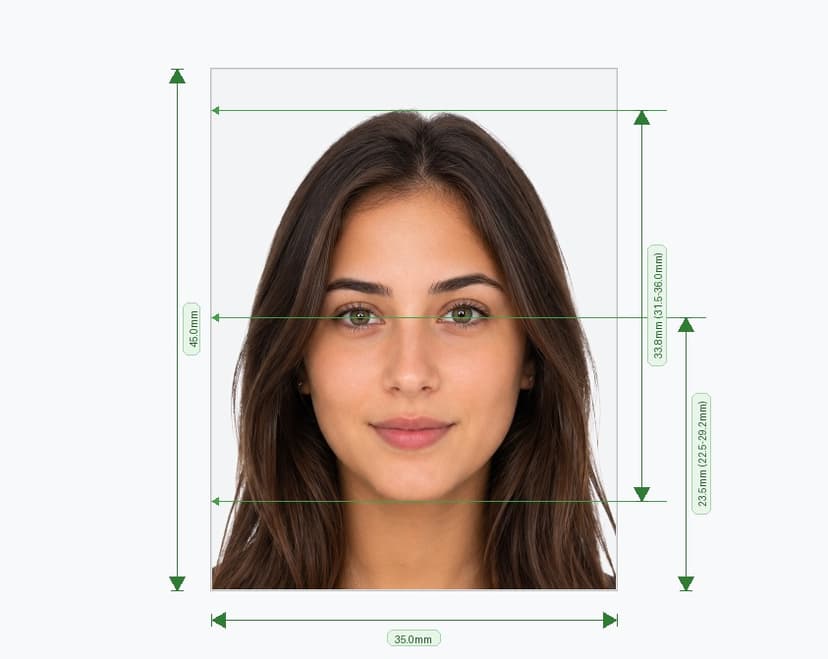
Create a Compliant Denmark Passport Photo Online in Minutes
Danish passport applications, submitted through your local Borgerservice or Danish embassy, are checked against strict rules before your file even reaches an officer's desk. A single wrong detail in your pasfoto — the wrong background, an off-scale head size, or a shadow across the face — can send you back for a retake. This tool turns one selfie into a passport photo that matches every specification Denmark checks: exact size, approved background, and correct head-to-frame ratio. Upload a photo, and the tool resizes, crops, and adjusts it automatically, then delivers a print-ready file sized precisely to Danish requirements. Below, we walk through exactly what the tool corrects and why each rule exists.
What This Tool Delivers
How the Tool Works
What Denmark Actually Checks — and What the Tool Fixes for You
Even a good phone photo usually fails one of these points. Here's what gets corrected automatically, and why each rule exists.
Why the Light Grey Background Matters
Denmark requires a plain, light grey background because it directly affects how reliably your photo can be processed for the biometric chip in your passport.
Contrast for Facial Recognition
An uneven or patterned background makes it harder for recognition software to trace the outline of your face and hair, particularly for people with very light or very dark hair. That's exactly why the tool replaces your background instead of asking you to find a specific wall — it guarantees the contrast Danish passport software needs, every time.
Consistency Across Applications
A uniform grey backdrop, free of shadow and texture, lets Danish authorities compare photos against a consistent standard. Photos taken casually — against a patterned wall, in uneven light, or with a visible shadow — are among the most common reasons applications get sent back for a retake.
What Borgerservice Checks in Person
Once your digital file is ready, you'll typically bring it — printed or on file — to your local Borgerservice or embassy appointment. These are the points most likely to cause a delay there, and the ones this tool has already handled for you:
- Expression must stay neutral, with the mouth closed and no smile.
- Both eyes must be fully open and clearly visible.
- Glasses are not accepted unless medically required, and frames must not obscure the eyes.
- Headwear is not permitted except for documented religious reasons, and it must never cover any part of the face.
- Lighting must be even, with no shadow on the face or the background.
Skip the Photo Studio
A professional photo studio works, but it costs more and takes a trip out of your day. Many photographers also aren't precisely calibrated to Danish passport dimensions, which means a photo that looks fine can still get flagged. This tool builds your pasfoto to the exact pixel size, background tone, and head-height range Danish authorities expect, using a photo you take yourself at home.
Using Your File for Your Danish Passport Application
Whether you're applying at a Borgerservice location in Denmark or through a Danish embassy abroad, your pasfoto online needs to match the same fixed standard: 35 x 45mm, light grey background, and a face that fills 70% to 80% of the frame. This tool produces both formats you'll typically need — a digital file at 413 x 531 px for any online step in the process, and a printed 4x6 sheet you can bring directly to your appointment.
Because requirements can vary slightly between individual embassies, it's worth double-checking your specific location's submission process — but the core photo specification stays consistent across Denmark's passport system.
Frequently Asked Questions
Will this photo definitely be accepted? The tool corrects every technical requirement checked by size and background — framing, scale, and grey backdrop. Expression, eye visibility, and glasses are flagged for you to fix at the photo-taking stage, since those depend on the original shot.
Can I wear glasses if I need them to see? Only for documented medical reasons, and even then, frames must not obscure your eyes or create glare — the tool checks for both automatically.
What do I get after processing? A 413 x 531 px digital file and a print-ready 4x6 sheet, both matching Denmark's official passport photo specification.
What if my photo gets flagged? Retake it following the on-screen guidance — usually background, lighting, or glasses — and reprocess. There's no limit on attempts.
Upload your photo, let the tool handle the size, background, and framing, and walk into your Borgerservice appointment with a file that's already built to pass.