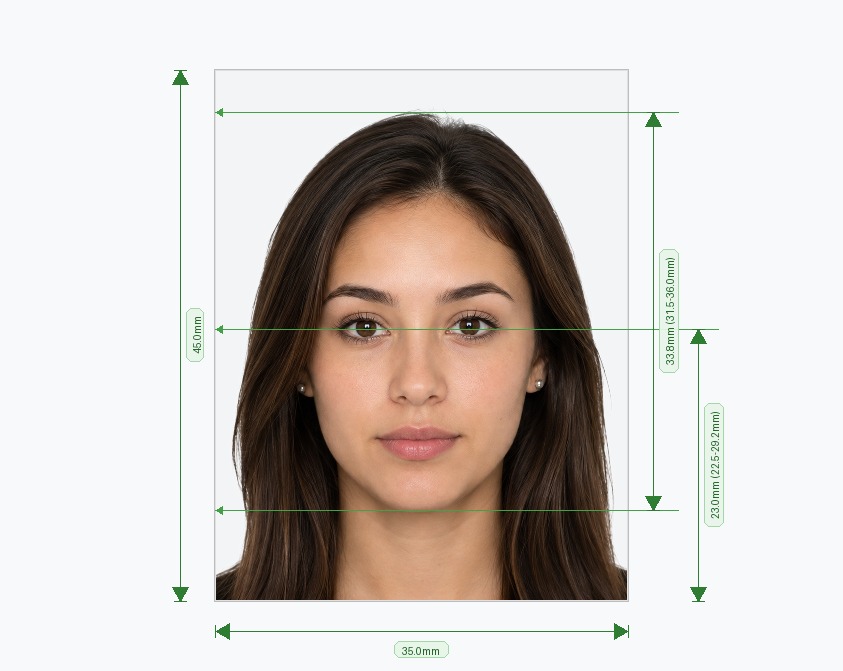
Need a passport size photo today? Our passport size photo maker turns any picture into a correctly sized, print-ready image in under two minutes. Choose your country and document, upload a photo, and let the tool do the rest. It crops your image to the right dimensions, replaces the background and checks the result against official rules.
Whether you need a 35×45 mm photo for a UK or Schengen application, a 2×2 inch photo for a US visa, or a custom size for another country, you can create a passport picture online right on this page. No studio visit, no ruler and no photo editing skills required.
How to Make a Passport Size Photo Online in 3 Steps
Follow these three steps to make a passport picture online. The whole process takes about two minutes.
Upload Your Photo
Select your country and document type first, such as passport, visa, ID card or driving licence. The tool then loads the official size, resolution and background rules. Next, take a new photo with your phone or pick one from your gallery.
- Face the camera directly and keep your head level.
- Keep a neutral expression with your mouth closed.
- Stand facing a window for soft, even light.
- Ask a friend to shoot from about 1.5 metres (5 feet) away to avoid distortion.
Any background works, because the tool replaces it for you.
Auto-Crop & Background Fix
Once you upload your image, the tool finds your face, removes the old background and applies the colour your document requires. It then crops the frame to the exact passport size.
Feature: Instant passport size crop
Manual cropping is where most people go wrong. Our tool uses facial landmark detection to place your eyes, chin and crown within the ratios that government guidelines demand. You get the right head size and the right margins without any guesswork.
Download, Print or Share
Preview your result, then download it. Use the digital file for online applications, such as the US DS-160 visa form or the UK passport renewal portal. Choose the print option when a paper application needs physical photos.
Feature: Ready-to-print copies on one sheet
The print template places several correctly sized photos on a single 4×6 inch sheet. Take it to any local photo printer or print shop and cut the photos apart. Ask for real photo paper, because plain office paper often gets rejected.
Why Use Our Passport Size Photo Maker?
Wrong sizing is the most common reason passport and visa photos get rejected. The head is too small, the crop is off-centre or the resolution is too low. Our passport picture maker solves these problems at the source.
- Country-specific profiles: Every supported country has its own stored width, height, head-to-frame ratio, resolution and background colour.
- AI background removal: The tool separates you from any background and swaps in the required white, off-white, light grey or light blue.
- Biometric cropping: Face detection positions your head to match official percentages, not just a rough guess.
- Automatic quality checks: Before you download, the tool checks sharpness, lighting, eye visibility, head tilt and output resolution.
- Digital and print output: Get a standalone file for online forms and a print sheet for paper applications.
Passport Size Photo Specifications
There is no single universal passport size. Each country sets its own dimensions, head height and background colour. This table shows the formats people request most often. Select your country in the tool above and it applies the right specification for you.
| Country or document | Photo size | Head height | Background |
|---|---|---|---|
| United States (passport and visa) | 2×2 in (51×51 mm) | 1 to 1⅜ in | White |
| United Kingdom (passport) | 35×45 mm | 29–34 mm | Light grey or cream |
| Schengen visa (Europe) | 35×45 mm | 32–36 mm | Plain light grey or white |
| India (passport and visa) | 51×51 mm, or 35×45 mm on some forms | Varies by form | White |
| Canada (passport) | 50×70 mm | 31–36 mm | White |
Rules change, so always check your embassy or passport authority for the latest requirements before you apply. Two of the most common formats are the 35×45 mm standard used across the UK, Europe and many other countries, and the 2×2 inch format used for US documents. Our tool supports both, plus many more.
Background Requirement: White background, face centred and evenly lit
A clean background and good lighting decide whether a photo passes. Most countries ask for a plain white background, but some use light grey, cream or light blue. The UK, for example, requires light grey or cream, not white. Our tool applies the correct colour for your document automatically.
Whatever the country, aim for these basics:
- Centred face: Your head sits in the middle of the frame, with your shoulders visible.
- Even lighting: No shadows on your face or behind you, and no glare on your skin.
- Neutral expression: Eyes open, mouth closed, no smiling or raised eyebrows.
- Clear view of your face: Hair away from your eyes, no sunglasses and no hat. Check your country's rule on glasses, because some countries ban them entirely.
- Sharp image: No blur, no filters and no heavy retouching.
Common reasons passport photos get rejected:
- The wrong size or head height for the country.
- The wrong background colour, or shadows behind you.
- Glare, blur or low resolution.
- A tilted head, a smile or closed eyes.
- An old photo that no longer looks like you.
- Filters, beauty modes or heavy retouching.
Our automatic checks flag most of these problems before you download, so you can retake the photo instead of losing days to a rejected application.
Students, travellers, professionals and families all use the tool. It works for emergency renewals when speed matters and for planned applications when you want to avoid studio prices. HR teams also use it to prepare employee immigration documents.
Frequently Asked Questions
Avoid Passport & Visa Photo Rejections
Our automatic AI tool fixes background shadows, crops to exact millimeter specs (2x2" or 35x45mm), and guarantees 100% biometric compliance.
Create & Fix My Photo Now