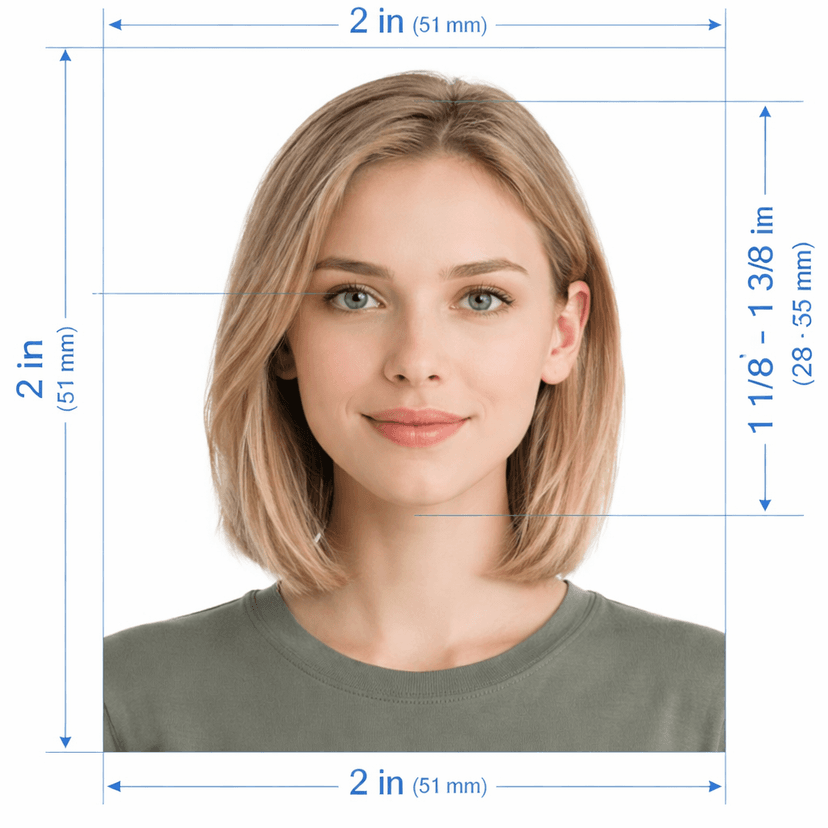
Create Your Saudi Arabia Passport Photo Online — 40×60mm, Absher-Ready
Upload a photo and this tool builds a fully compliant Saudi passport photo automatically. It crops to the required 40mm × 60mm size — larger than the standard 35×45mm format most countries use — positions your head inside the 70%–80% frame-height window, swaps your background for pure white, and exports a 944×1417px JPEG at 300 DPI ready for Absher's biometric registration. No studio visit, no cropping errors common with this larger format.
The Ministry of Interior's Absher platform runs facial-recognition checks on every submitted photo, so getting the 40×60mm frame and head scale exactly right matters more here than with smaller passport formats. This tool builds every export around that exact ratio.
How the Tool Works
- Upload a photo. A recent, well-lit photo against a plain wall gives the AI what it needs.
- The AI measures and crops. Landmark detection builds the 40×60mm frame around your face and scales your head into the 70%–80% window — avoiding the cropping mistakes this larger format often causes.
- Download and submit. Get a 944×1417px JPEG ready for Absher upload plus a print-ready A4 sheet if a physical copy is requested.
Saudi Arabia Passport Photo — 2026 Specifications
What the Tool Fixes Automatically
- Wrong crop ratio: the 40×60mm frame is taller than most passport formats, and manual cropping often clips the shoulders or leaves too much headroom — the tool scales your head into 70%–80% without either mistake.
- Off-white background: the AI removes any wall or backdrop and replaces it with verified pure white.
- Uneven lighting: exposure balances across the face so Absher's facial-recognition check reads clean, shadow-free features.
- Low resolution: every export renders at 300 DPI so the 944×1417px file stays sharp for both digital and print submission.
Check These Before You Upload
The tool handles cropping, background, and lighting. You still control expression and head coverings:
- Keep a neutral expression with eyes open and mouth closed
- Look directly at the camera for a full frontal view
- For male applicants, traditional headgear (ghutra or shemagh) stays on, provided it doesn't cover the face
- For female applicants, keep the full face visible from the bottom of the chin to the top of the forehead
- Use a recent photo that matches your current appearance
Frequently Asked Questions
Why does the 40×60mm size cause more cropping errors than other passport photos?
It's taller relative to its width than the common 35×45mm standard, so a manual crop often leaves the head too small or clips the shoulders. This tool's landmark detection scales specifically for this ratio, keeping the head inside 70%–80% regardless of the source photo's framing.
Can I wear my ghutra or shemagh in the photo?
Yes. Traditional headgear is permitted for male applicants as long as it doesn't cover any part of the face.
Does Absher accept a photo with a light grey or blue background?
No. Only pure white passes — this tool always outputs a verified white background regardless of what you photographed against.
Can I use a photo I already have on my phone?
Yes. Upload any recent, well-lit photo and the tool rebuilds it to the exact 40×60mm frame and 70%–80% head scale Absher checks for.
What resolution does the digital file need for Absher upload?
This tool exports at 944×1417px, 300 DPI — sharp enough for both the digital biometric registration and a physical print if one is requested.
Compliant Photo for Absher
This AI tool builds a 40×60mm photo scaled and centred to pass Absher's biometric facial-recognition check, avoiding the cropping errors this larger format often causes.