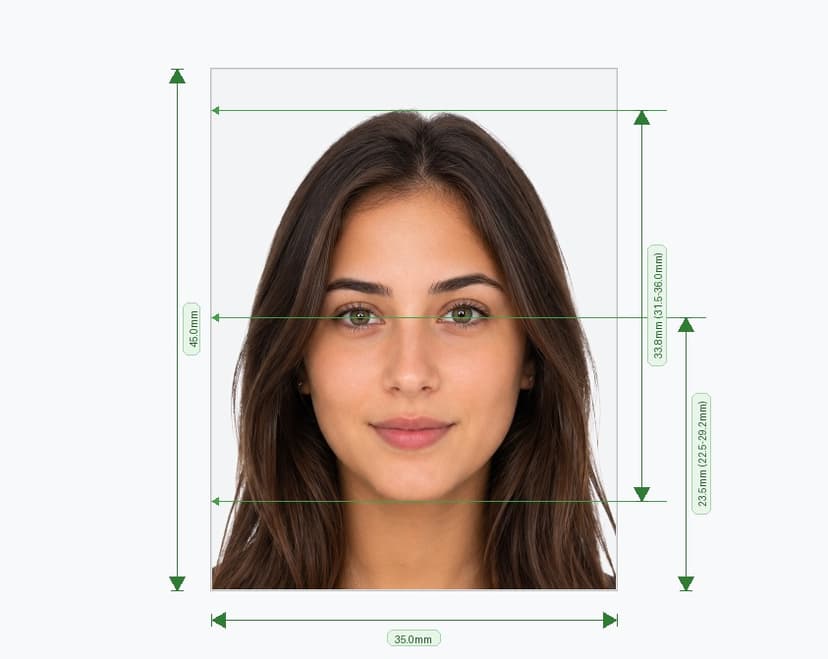
Singapore Visa Photo Requirements
Singapore visa photos follow the same standard as passport photos: 35mm x 45mm, or 413x531 pixels at 300 DPI. Whether you're applying for a work pass, student pass, or entry visa, your photo must meet these exact dimensions to avoid delays at ICA.
Singapore Visa Photo Guidelines
- Dimensions: 35mm x 45mm (413x531 pixels).
- Background: Plain white, free of shadows, patterns, or color casts.
- Face coverage: Your face should take up 70-80% of the photo, from chin to top of head.
- Expression: Look straight at the camera with a neutral expression and closed mouth.
- Eyes: Keep both eyes open and clearly visible, with no hair or glare covering them.
- Glasses and headwear: Remove glasses unless medically required, and avoid headwear except for religious purposes.
- Lighting: Use soft, even lighting across your face and the background.
Why Precise Photo Specs Matter for Visa Applications
ICA and visa processing centers rely on biometric standards to verify identity. A photo that falls outside the required proportions gets flagged, and you'll need to resubmit before your application moves forward. Since visa processing already takes time, submitting a correctly formatted photo upfront keeps your application on schedule.
Steps to Capture a Compliant Visa Photo
- Choose a plain white wall as your backdrop.
- Position yourself in natural, diffused light to avoid shadows.
- Face the camera directly, keeping your head straight and level.
- Shoot from a slight distance to prevent lens distortion.
- Check the image for sharpness and correct framing before submitting.
Singapore Visa Photo Maker: Get It Right Instantly
A regular selfie won't meet visa standards. Our singapore visa photo maker takes your existing photo and reshapes it to match ICA's exact biometric requirements, adjusting face size, centering, and background in one step. This removes the trial-and-error most people go through with manual cropping tools.
Singapore Visa Photo Online: No Studio Visit Needed
Our singapore visa photo online tool lets you upload a photo from your phone or computer and receive a compliant file within seconds. You skip the appointment, the wait, and the extra cost of a physical photo studio.
Convert and Resize Your Photo for Visa Use
If your current photo isn't sized correctly, our system will convert your photo to passport size and resize it to fit Singapore's visa specifications automatically. Just upload the image, and the tool handles cropping, background replacement, and pixel-perfect resizing.
Where This Photo Applies
- Work pass and employment pass applications.
- Student pass applications for schools and universities in Singapore.
- Long-term visit pass and dependent pass applications.
- Entry visa applications processed through ICA.
Mistakes That Cause Visa Photo Rejections
- Non-white backgrounds: Colored or textured backdrops trigger an automatic rejection.
- Tilted head or off-center framing: Your face must sit centered and straight within the frame.
- Outdated photos: Most applications require a photo taken within the last six months.
- Filters or heavy editing: Avoid beauty filters or color correction that alters your natural appearance.
Getting your visa photo size right the first time removes one more obstacle from your application. Print your final photo at 4x6 for easy handling, and submit it alongside your visa documents.