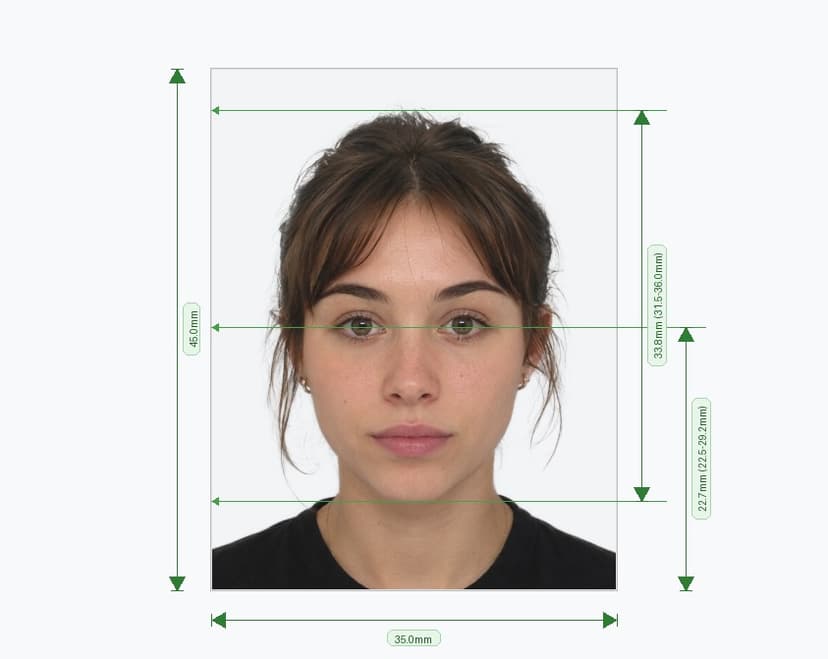
Sri Lanka Passport Photo Requirements (2026)
Submitting the correct passport photo is one of the most critical steps in your Sri Lanka passport application. The Department of Immigration and Emigration of Sri Lanka enforces strict biometric photo standards, and any non-compliant photo will result in your application being rejected or delayed. This complete guide outlines every official requirement you need to meet for a Sri Lanka passport photo in 2026 — from dimensions and background to facial expression and print quality.
Photo Size and Dimensions
The official Sri Lanka passport photo size is 35 mm × 45 mm (3.5 cm × 4.5 cm), equivalent to approximately 1.37 × 1.77 inches. At 600 DPI resolution, this corresponds to 413 × 531 pixels. Photos that deviate from these exact dimensions will not be accepted. Applicants are typically required to submit two to three identical photos along with their application. The photo must be printed on professional-grade continuous-tone photo paper — Polaroid prints and photos produced on standard desktop inkjet or laser printers are explicitly not acceptable.
Background Requirements
According to official specifications published by Sri Lankan embassies, the background must be plain and light-colored — white, light blue, or light grey — and must clearly contrast with the applicant's face and clothing. The background must be entirely free of patterns, textures, gradients, furniture, or any other objects. Uniform lighting must be used to eliminate shadows on the background. Any shadow falling behind the subject will result in the photo being rejected.
Head Size, Position, and Framing
The photo must show a close-up of the head and partial shoulders. The face — measured from the forehead edge to the bottom of the chin — must occupy 70% to 80% of the total photo height, which corresponds to approximately 2.5 cm (25 mm) of the 45 mm image height. The head must be perfectly centered within the frame and positioned straight — no tilting, turning, or angling in any direction. The full face from chin to crown must be visible, and no part of the head should be cut off at any edge.
Eyes, Face, and Expression
Both eyes must be fully open, clearly visible, and looking directly into the camera. No hair should obscure the face, forehead, or ears. The eyes must not be affected by red-eye — photos with red-eye will not be accepted. A neutral facial expression with a closed mouth is required; smiling, frowning, raised eyebrows, squinting, or any exaggerated expression is prohibited. The face must be in sharp focus and free from any ink marks, creases, lines, or blemishes on the print.
Lighting and Skin Tone
The photo must have adequate, uniform brightness and contrast. The applicant's skin tone must appear natural — over-exposed photos where skin appears too light, and under-exposed photos where skin appears too dark, will not be accepted. Use diffused, even lighting from the front to avoid harsh shadows on the face, particularly around the nose, chin, and eye sockets. Flash photography should be handled carefully to prevent uneven lighting or glare.
Clothing and Accessories
Wear your everyday, regular clothing for the photo. There is no specific dress code, but clothing should clearly contrast with the background — avoid wearing all-white or very light-colored tops that may blend into the background. Uniforms or costumes that resemble official, military, or government attire are not permitted. Spectacles (glasses) are not accepted under any circumstances for Sri Lanka passport photos — this is an absolute rule stated in the official specifications, with no medical exceptions. Head coverings and head-dress are generally not allowed; however, religious or medical exceptions may apply provided the full face remains clearly visible from chin to forehead with no shadows cast on the face.
Digital Photo Submission Process
For in-country passport applications, the Department of Immigration and Emigration requires applicants to visit an authorized photo studio that is registered with the department's digital photo submission system. The studio captures your biometric photograph and transmits it electronically to the Department's computer system. The studio then issues a Studio Acknowledgement Note, which must be submitted with your application documents. No physical printed photographs are required for in-country applications processed at the Head Office or regional offices. Applicants applying through Sri Lankan Diplomatic Missions overseas may submit applications without a digital photograph, providing fingerprints upon their first arrival in Sri Lanka.
Photo Recency
Passport photos must have been taken within the last six months of your application date. Only current, recent photos that accurately represent your present appearance will be accepted. Photos that are older than six months will be rejected regardless of quality.
Children and Infants
All children, including newborns, must have their own individual Sri Lanka passport — inclusion of children in a parent's passport is no longer permitted. Children's passport photos must meet the same technical specifications as adult photos. The child must be the only subject in the frame, with no hands, toys, car seats, or other people visible. For infants, closed eyes may be tolerated given the difficulty of keeping very young children alert, but open eyes are always preferred.
Common Reasons for Rejection
The most frequent reasons Sri Lanka passport photos are rejected by the Department of Immigration and Emigration include: wearing spectacles, shadows on the face or background, incorrect head size proportions, photo older than six months, non-uniform or patterned background, red-eye effect, poor print quality (inkjet or Polaroid prints), digital retouching or editing, and head tilting or turning.