Create Estonia Passport Photo: The Complete 2025 Guide
The Police and Border Guard Board (PPA) rejects thousands of Estonian passport applications every year because of non-compliant photos. A single mistake — the wrong background, a tilted head, or an outdated image — can delay your passport by weeks. This guide walks you through every official requirement so you get it right the first time.
Photo Dimensions and Digital Specifications
Estonia enforces strict technical standards for passport photos, whether you print them or upload them to the self-service portal.
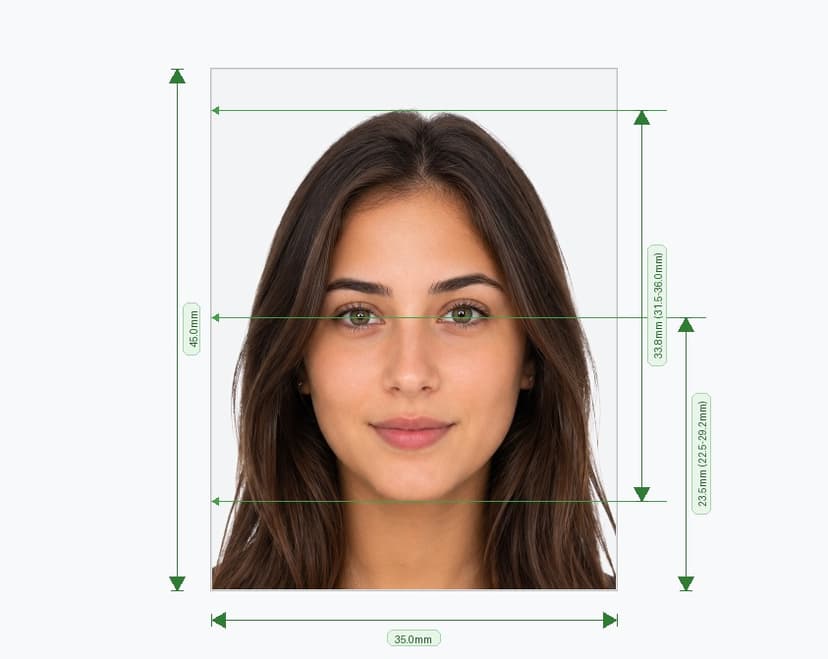
- Print size: 35mm x 45mm (413 x 531 pixels at 300 DPI).
- Digital upload minimum: at least 1,300 x 1,600 pixels.
- File size: between 1MB and 5MB for digital submissions.
- Color: full color only — black-and-white photos are not accepted.
- Editing: the photo must remain unedited. Do not retouch skin, remove blemishes, or apply filters.
- Source: scanned photos and screenshots from a computer or phone screen are strictly prohibited.
Background Requirements
Use a plain, light-colored background with no texture, pattern, gradient, or shadow. Light grey is the standard choice, though any single light tone works if it contrasts clearly with your hair and skin. Remove furniture, doors, and other objects from the frame, and make sure no shadow falls on the wall behind you.
Face Size and Positioning
Center your face in the frame and keep your head straight — do not tilt it left, right, forward, or back. Your face should fill 70-80% of the photo height, measured from chin to crown. Look directly into the lens with both eyes level and fully open; the camera should sit at eye level, not above or below.
Expression Rules
Keep a neutral expression with your mouth closed. Smiling, frowning, or raising your eyebrows can cause rejection. Relax your shoulders and face the camera squarely rather than at an angle.
Glasses and Headwear
Estonia generally advises against wearing glasses in passport photos. If you must wear them for medical reasons, remove sunglasses and tinted lenses entirely, and make sure the frames never cover your eyes. Avoid any glare or reflection on the lenses — reposition your lighting or remove the glasses if reflections persist. Headwear, hats, and headphones are not permitted, except for religious head coverings, which must not obscure any part of your face from the forehead to the chin.
Lighting Quality
Use soft, even lighting from the front so no shadows fall across your face, neck, or the background. Avoid harsh overhead light, which creates dark patches under the eyes and nose, and avoid backlighting, which darkens your face while overexposing the background.
Where to Take Your Passport Photo
You have three official options in Estonia:
- Photo booth at a PPA service office: Every service office offers a free digital photo booth, even if you're not submitting your application there. The photo is stored digitally and can be reused for 183 days for applications submitted at any service office or through the self-service portal (weapons permits are excluded from this option). While in the booth, you can also provide fingerprints and a signature sample if your application requires them.
- Photographer's studio: A professional photographer familiar with Estonian document standards can guarantee compliant lighting, background, and framing in a single visit.
- Self-taken photo: You may photograph yourself and upload the image to the self-service portal, but it must strictly follow every rule in this guide and must not be older than six months.
If you took your photo in a service office booth but plan to submit your application by email, mention this in your application. When emailing the photo, include the applicant's first name, surname, and personal identification number or date of birth in the message body so the PPA can match it to your record.
Special Instructions for Young Children (0-7 Years)
Photographing a young child is harder than photographing an adult, and Estonia adjusts its guidance accordingly.
- Book a session at a photographer's studio when possible — professionals are better equipped to capture a compliant image quickly.
- Photo booths often fail with young children because they can't hold still and face the camera long enough. If you must use a booth, ask a PPA official for assistance.
- Use a plain, light, single-color background with no patterns or objects.
- The child must look straight into the camera with a closed mouth.
- Remove large hair accessories, bows, and any toys or objects from the frame.
- As with adults, scans and screen screenshots are not accepted, and the photo must be unedited.
How to Photograph Yourself Correctly
If you're taking the photo without professional help, ask a family member, friend, or acquaintance to help you. Use the rear camera of a smartphone rather than the front-facing camera — front cameras use a wider lens that distorts facial proportions and can cause the photo to be rejected. Stand about two meters from a plain wall in a well-lit room, ideally near a window with diffused daylight, and have the photographer stand at your eye level.
Common Mistakes That Cause Rejection
- Submitting a photo older than six months (self-taken) or older than 183 days (photo booth).
- Using a colored, patterned, or shadowed background.
- Wearing sunglasses, tinted lenses, or a hat without religious grounds.
- Tilting the head or looking away from the camera.
- Applying filters, cropping tightly, or editing skin tone.
- Submitting a scanned print or a screenshot instead of an original digital file.
Before You Submit
Run through this quick checklist before uploading or printing your photo: correct pixel dimensions and file size, plain light background, neutral expression, centered and level face, no headwear or glare, and a file that has not been edited. A non-compliant photo extends processing time, so a few extra minutes of care now saves you weeks later.