Create Estonia Visa Photo : What You Need to Know
An Estonian visa photo follows the same core standards as a passport photo, but the submission process and validity rules differ slightly depending on where and how you apply. This guide covers the technical specifications, composition rules, and practical steps for getting a compliant visa photo, whether you're applying at an embassy, a consulate, or through the online portal.
Technical Specifications
Your visa photo must meet the same measurable standards used for Estonian passports.
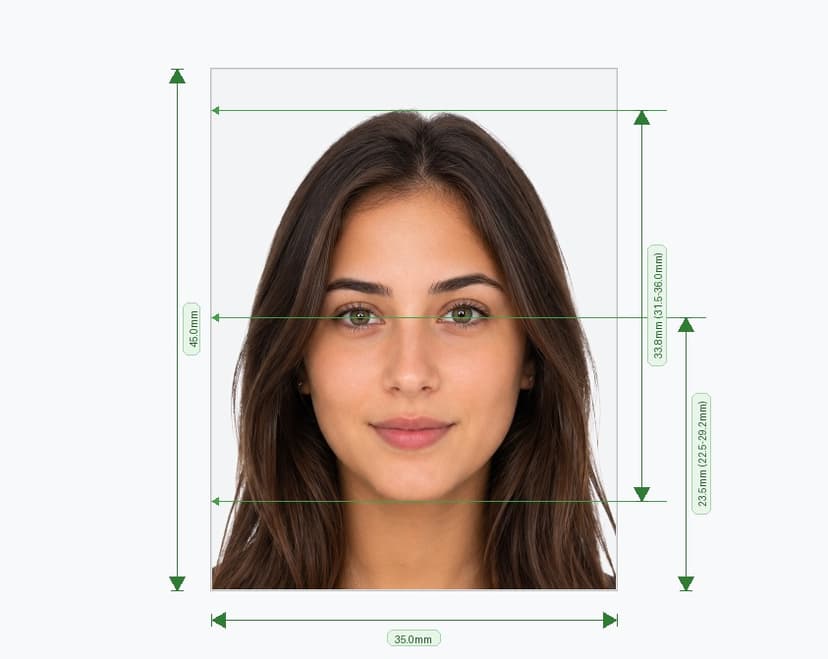
- Standard print size: 35mm x 45mm (413 x 531 pixels at 300 DPI).
- Digital submission minimum: at least 1,300 x 1,600 pixels.
- File size: between 1MB and 5MB when uploading digitally.
- Color format: full color, never black-and-white.
- No editing: the photo must be an unedited, unaltered original.
- No scans or screenshots: a scanned print or a screenshot of a phone or computer screen is not accepted under any circumstances.
Background and Lighting
Photograph yourself against a plain, light, single-color background — light grey works best — with no shadows, patterns, or objects visible behind you. Light the face evenly from the front so no shadows fall across your cheeks, nose, or the background wall. Avoid strong side lighting, overhead lighting, and backlit setups, all of which distort skin tone and obscure facial features that visa officers need to see clearly.
Head Position and Face Size
Center your face in the frame and keep your head level — no tilting forward, backward, or to either side. Your face must occupy 70-80% of the photo's total height, measured from your chin to the top of your head. Look directly at the camera with both eyes open and level with one another.
Expression and Posture
Keep your expression neutral, with your mouth closed and your face relaxed. Do not smile, frown, or raise your eyebrows. Square your shoulders to the camera rather than turning at an angle, since an angled pose can distort the perceived proportions of your face.
Glasses and Head Coverings
Remove glasses whenever possible for a visa photo. If you need them for medical reasons, take off sunglasses or tinted lenses entirely, and make sure the frames don't cover your eyes and don't cast glare or reflections. Hats, headphones, and other headwear are not permitted, with one exception: religious head coverings are allowed as long as they leave your entire face, from forehead to chin, fully visible.
Adults vs. Children: Different Rules Apply
For adults, follow every requirement above precisely, using the rear camera of a smartphone (never the front camera, which distorts facial proportions) if you're photographing yourself at home. Ask someone else to take the picture for you and stand roughly two meters from a plain, evenly lit wall.
For children aged 0-7, Estonia recommends visiting a photographer's studio instead of a self-service photo booth, since young children often can't hold still long enough for a booth to capture a usable image. If a studio isn't available, a PPA official can assist with a booth photo. Children's photos must show a straight gaze into the camera with a closed mouth, a plain light background, and no large hair accessories or toys in frame.
Where to Get Your Visa Photo Taken
- PPA service office photo booth: Free to use, even if you're not filing your application at that location. The digital photo remains valid for 183 days and can be reused across service offices or the self-service portal, with the exception of weapons permit applications.
- Professional photographer: A studio experienced with Estonian visa and passport standards can produce a compliant photo in one sitting, which is especially useful if you're on a tight visa appointment timeline.
- Self-taken photo: Acceptable for upload to the self-service portal, provided it is no older than six months and meets every requirement listed above.
Submitting by Email
If you took your photo at a service office booth but are submitting your visa application by email, note this explicitly in your application. Include the applicant's first name, surname, and either their personal identification number or date of birth in the email body so the office can correctly match the photo to the file.
Mistakes That Delay Visa Processing
- Using a photo older than the six-month (self-taken) or 183-day (photo booth) validity window.
- Submitting a scanned or screenshotted image instead of an original digital file.
- Wearing tinted glasses, a hat, or headphones without a religious exemption.
- Uneven lighting that creates shadows on the face or background.
- A tilted head, closed eyes, or an off-center face.
- Editing or retouching the image, including cropping that changes the required proportions.
Final Check Before You Apply
Before attaching your photo to a visa application, confirm the file size and pixel dimensions match the requirements, the background is plain and light, your expression is neutral, your head is level and centered, and the image is a genuine, unedited digital file. Taking a few extra minutes to verify these details helps you avoid the processing delays that come with a rejected photo.